Sunday, June 30, 2013

Firefox Speed Tweaks

Yes, firefox is already pretty damn fast but did you know that you can tweak it and improve the speed even more?

That's the beauty of this program being open source.
Here's what you do:
In the URL bar, type “about:config” and press enter. This will bring up the configuration “menu” where you can change the parameters of Firefox.

Note that these are what I’ve found to REALLY speed up my Firefox significantly - and these settings seem to be common among everybody else as well. But these settings are optimized for broadband connections - I mean with as much concurrent requests we’re going to open up with pipelining… lol… you’d better have a big connection.

Double Click on the following settins and put in the numbers below - for the true / false booleans - they’ll change when you double click.

Code:
browser.tabs.showSingleWindowModePrefs – true
network.http.max-connections – 48
network.http.max-connections-per-server – 16
network.http.max-persistent-connections-per-proxy – 8
network.http.max-persistent-connections-per-server – 4
network.http.pipelining – true
network.http.pipelining.maxrequests – 100
network.http.proxy.pipelining – true
network.http.request.timeout – 300


One more thing… Right-click somewhere on that screen and add a NEW -> Integer. Name it “nglayout.initialpaint.delay” and set its value to “0”. This value is the amount of time the browser waits before it acts on information it receives. Since you’re broadband - it shouldn’t have to wait.

Now you should notice you’re loading pages MUCH faster now!

Wednesday, June 26, 2013

250+ Tech books online

1
10 minute guide to lotus notes mail 4.5
http://www.parsian.net/set1252/pages/books.htm

2
10 minute guide to Microsoft exchange 5.0
http://www.parsian.net/set1252/pages/books.htm

3
10 minute guide to outlook 97
http://www.parsian.net/set1252/pages/books.htm

4
10 minute guide to schedule+ for windows 95
http://www.parsian.net/set1252/pages/books.htm

5
ActiveX programming unleashed
http://www.parsian.net/set1252/pages/books.htm

6
ActiveX programming unleashed
http://www.emu.edu.tr/english/facilitiesservices/computercenter/bookslib/

7
Advanced perl programming
http://www.hk8.org/old_web/

8
Advanced PL/SQL programming with packages
http://www.hk8.org/old_web/

9
Adventure in Prolog/AMZI
www.oopweb.com

10
Algorithms CMSC251/Mount, David
www.oopweb.com

11
Alison Balter's Mastering Access 95 development, premier ed.
http://www.emu.edu.tr/english/facilitiesservices/computercenter/bookslib/

12
Apache : The definitive guide, 3rd.ed.
http://www.hk8.org/old_web/

13
Beej's guide to network programming/Hall, Brain
www.oopweb.com

14
Beyond Linux from Scratch/BLFS Development Team
http://book.onairweb.net/computer/os/linux/Administration/Beyond_Linux_From_Scratch/

15
Borland C++ builder unleashed
http://www.parsian.net/set1252/pages/books.htm

16
Building an intranet with windows NT 4
http://www.parsian.net/set1252/pages/books.htm

17
Building an Intranet with Windows NT 4
http://www.emu.edu.tr/english/facilitiesservices/computercenter/bookslib/

18
Building expert systems in prolog/AMZI
www.oopweb.com

19
C programming language
http://book.onairweb.net/computer/pl/C/The_C_Programming_Language_by_K&R/

20
C Programming/Holmes, Steven
www.oopweb.com

21
C++ Annotations
www.oopweb.com

22
CGI developer's guide
http://www.emu.edu.tr/english/facilitiesservices/computercenter/bookslib/

23
CGI manual of style
http://www.parsian.net/set1252/pages/books.htm

24
CGI manual of style online
http://www.emu.edu.tr/english/facilitiesservices/computercenter/bookslib/

25
CGI programming
http://www.hk8.org/old_web/

26
CGI programming unleashed
http://www.parsian.net/set1252/pages/books.htm

27
CGI programming with Perl, 2nd.ed.
http://www.hk8.org/old_web/

28
Charlie Calvert's Borland C++ builder unleashed
http://www.emu.edu.tr/english/facilitiesservices/computercenter/bookslib/

29
Client/server computing, 2nd.ed.
http://www.parsian.net/set1252/pages/books.htm

30
Client-server computing, 2nd.ed.
http://www.emu.edu.tr/english/facilitiesservices/computercenter/bookslib/

31
Common LISP, the language/Steele, Guy
www.oopweb.com

32
Compilers and compiler generators : an introduction with C++/Terry, P.D.
www.oopweb.com

33
Complete idiot's guide to creating HTML webpage
http://www.parsian.net/set1252/pages/books.htm

34
Computer graphics CMSC 427/Mount, David
www.oopweb.com

35
Configuring and troubleshooting the windows NT/95 registry
http://www.parsian.net/set1252/pages/books.htm

36
Creating commercial websites
http://www.emu.edu.tr/english/facilitiesservices/computercenter/bookslib/

37
Creating web applets with Java
http://www.emu.edu.tr/english/facilitiesservices/computercenter/bookslib/

38
Crystal Reports.NET
http://www.crystalreportsbook.com/Chapters.asp

39
Curious about the internet
http://www.emu.edu.tr/english/facilitiesservices/computercenter/bookslib/

40
Curious about the internet?
http://www.parsian.net/set1252/pages/books.htm

41
Dan appleman's developing activeX components with Visual Basic 5
http://www.emu.edu.tr/english/facilitiesservices/computercenter/bookslib/

42
Dan appleman's developing activex components with Visual Basic 5.0
http://www.parsian.net/set1252/pages/books.htm

43
Data structures CMSC420/Mount, David
www.oopweb.com

44
Database developer's guide with visual basic 4, 2nd.ed.
http://www.parsian.net/set1252/pages/books.htm

45
Database developer's guide with Visual Basic 4, 2nd.ed.
http://www.emu.edu.tr/english/facilitiesservices/computercenter/bookslib/

46
Database developer's guide with Visual C++ 4, 2nd.ed.
http://www.parsian.net/set1252/pages/books.htm

47
Database developer's guide with Visual C++ 4, 2nd.ed.
http://www.emu.edu.tr/english/facilitiesservices/computercenter/bookslib/

48
Design and analysis of computer algorithms CMSC451/Mount, David
www.oopweb.com

49
Designing implementing Microsoft internet information server
http://www.emu.edu.tr/english/facilitiesservices/computercenter/bookslib/

50
Designing implementing Microsoft proxy server
http://www.emu.edu.tr/english/facilitiesservices/computercenter/bookslib/

51
Developing for netscape one
http://www.parsian.net/set1252/pages/books.htm

52
Developing intranet applications with java
http://www.parsian.net/set1252/pages/books.htm

53
Developing personal oracle 7 for windows 95 applications
http://www.parsian.net/set1252/pages/books.htm

54
Developing personal Oracle 7 for windows 95 applications
http://www.emu.edu.tr/english/facilitiesservices/computercenter/bookslib/

55
Developing professional java applets
http://www.parsian.net/set1252/pages/books.htm

56
Developing professional java applets
http://www.emu.edu.tr/english/facilitiesservices/computercenter/bookslib/

57
DNS and BIND
http://www.hk8.org/old_web/

58
Doing objects with VB.NET and C#
http://vbwire.com/nl?6814

59
EAI/BPM Evaluation Series: IBM WebSphere MQ Workflow v3.3.2 & EAI Suite by
> Middleware Technology Evaluation Series, Phong Tran & Jeffrey Gosper
http://www.cmis.csiro.au/mte/reports/BPM_IBMwebsphereMQ332.htm

60
Effective AWK programming
http://book.onairweb.net/computer/os/shell/Effective_AWK_Programming/

61
Enterprise javabeans, 2nd.ed.
http://www.hk8.org/old_web/

62
Exploring java
http://www.hk8.org/old_web/

63
GNOME/Sheets, John
www.oopweb.com

64
Graph theory/Prof. Even
www.oopweb.com

65
Hacking java
http://www.parsian.net/set1252/pages/books.htm

66
How intranets work
http://www.parsian.net/set1252/pages/books.htm

67
How intranets work
http://www.emu.edu.tr/english/facilitiesservices/computercenter/bookslib/

68
How to program visual basic 5.0
http://www.parsian.net/set1252/pages/books.htm

69
How to use HTML 3.2
http://www.parsian.net/set1252/pages/books.htm

70
Html : The definitive guide
http://www.hk8.org/old_web/

71
HTML 3.2 & CGI unleashed
http://www.parsian.net/set1252/pages/books.htm

72
HTML 3.2 and CGI professional reference edition unleashed
http://www.emu.edu.tr/english/facilitiesservices/computercenter/bookslib/

73
HTML by example
http://www.emu.edu.tr/english/facilitiesservices/computercenter/bookslib/

74
Internet firewall
http://www.hk8.org/old_web/

75
Intranets unleashed
http://www.parsian.net/set1252/pages/books.htm

76
Introduction to object-oriented programming using C++/Muller, Peter
www.oopweb.com

77
Introduction to programming using Java/Eck, David
www.oopweb.com

78
Introduction to socket programming
http://book.onairweb.net/computer/network/An_Introduction_to_Socket_Programming/

79
Java 1.1 unleashed
http://www.emu.edu.tr/english/facilitiesservices/computercenter/bookslib/

80
Java 1.1 unleashed, 2nd.ed.
http://www.parsian.net/set1252/pages/books.htm

81
Java 1.1 unleashed, 3rd.ed.
http://www.parsian.net/set1252/pages/books.htm

82
Java 114 documentation
http://www.emu.edu.tr/english/facilitiesservices/computercenter/bookslib/

83
Java AWT reference
http://www.hk8.org/old_web/

84
Java by example
http://www.emu.edu.tr/english/facilitiesservices/computercenter/bookslib/

85
Java developer's guide
http://www.parsian.net/set1252/pages/books.htm

86
Java developer's guide
http://www.emu.edu.tr/english/facilitiesservices/computercenter/bookslib/

87
Java developer's reference
http://www.parsian.net/set1252/pages/books.htm

88
Java developer's reference
http://www.emu.edu.tr/english/facilitiesservices/computercenter/bookslib/

89
Java Distributed computing
http://www.hk8.org/old_web/

90
Java enterprise
http://www.hk8.org/old_web/

91
Java enterprise in a nutshell
http://www.hk8.org/old_web/

92
Java foundation classes in a nutshell
http://www.hk8.org/old_web/

93
Java fundamental classes reference
http://www.hk8.org/old_web/

94
Java in a nutshell
http://www.hk8.org/old_web/

95
Java in a nutshell, 3rd.ed.
http://www.hk8.org/old_web/

96
Java language reference
http://www.hk8.org/old_web/

97
Java security
http://www.hk8.org/old_web/

98
Java servlet programming
http://www.hk8.org/old_web/

99
Java unleashed
http://www.parsian.net/set1252/pages/books.htm

100
Java unleashed
http://www.emu.edu.tr/english/facilitiesservices/computercenter/bookslib/

101
Java, 2nd.ed.
http://www.emu.edu.tr/english/facilitiesservices/computercenter/bookslib/

102
_JavaScript : the definitive guide
http://www.hk8.org/old_web/

103
_Javascript manual of style
http://www.parsian.net/set1252/pages/books.htm

104
_Javascript manual of style
http://www.emu.edu.tr/english/facilitiesservices/computercenter/bookslib/

105
Josh's GNU Linux Guide/Joshua
http://book.onairweb.net/computer/os/linux/Administration/Josh's_GNU_Linux_Guide/

106
Late night activex
http://www.parsian.net/set1252/pages/books.htm

107
Late night activeX
http://www.emu.edu.tr/english/facilitiesservices/computercenter/bookslib/

108
Laura lemay's 3D graphics in and VRML 2
http://www.parsian.net/set1252/pages/books.htm

109
Laura lemay's activex and _VBScript
http://www.parsian.net/set1252/pages/books.htm

110
Laura lemay's graphics and web page design
http://www.parsian.net/set1252/pages/books.htm

111
Laura lemay's guide to sizzling websites design
http://www.parsian.net/set1252/pages/books.htm

112
Laura lemay's _javascript 1.1
http://www.parsian.net/set1252/pages/books.htm

113
Laura lemay's web workshop activex and _VBScript
http://www.emu.edu.tr/english/facilitiesservices/computercenter/bookslib/

114
Laura lemay's web workshop Graphics web page design
http://www.emu.edu.tr/english/facilitiesservices/computercenter/bookslib/

115
Laura lemay's web workshop _javascript
http://www.emu.edu.tr/english/facilitiesservices/computercenter/bookslib/

116
Learning perl
http://www.hk8.org/old_web/

117
Learning perl on win32
http://www.hk8.org/old_web/

118
Learning the kornshell
http://www.hk8.org/old_web/

119
Learning unix
http://www.hk8.org/old_web/

120
Learning vi
http://www.hk8.org/old_web/

121
Linux from Scratch/Beekmans, Gerard
http://book.onairweb.net/computer/os/linux/Administration/Linux_From_Scratch/

122
Linux in a nutshell, 3rd.ed.
http://www.hk8.org/old_web/

123
Linux kernel/Rusling, David
www.oopweb.com

124
Linux network administrator's guide/Dawson, Terry
www.oopweb.com

125
Linux system administrator's survival guide
http://www.emu.edu.tr/english/facilitiesservices/computercenter/bookslib/

126
MAPI, SAPI and TAPI developer's guide
http://www.parsian.net/set1252/pages/books.htm

127
Mastering access 95 development
http://www.parsian.net/set1252/pages/books.htm

128
Microsoft access 97 quick reference
http://www.parsian.net/set1252/pages/books.htm

129
Microsoft access 97 quick reference
http://www.emu.edu.tr/english/facilitiesservices/computercenter/bookslib/

130
Microsoft backoffice 2 unleashed
http://www.parsian.net/set1252/pages/books.htm

131
Microsoft excel 97 quick reference
http://www.parsian.net/set1252/pages/books.htm

132
Microsoft excel 97 quick reference
http://www.emu.edu.tr/english/facilitiesservices/computercenter/bookslib/

133
Microsoft exchange server survival guide
http://www.emu.edu.tr/english/facilitiesservices/computercenter/bookslib/

134
Microsoft frontpage unleashed
http://www.emu.edu.tr/english/facilitiesservices/computercenter/bookslib/

135
Microsoft word 97 quick reference
http://www.parsian.net/set1252/pages/books.htm

136
Microsoft word 97 quick reference
http://www.emu.edu.tr/english/facilitiesservices/computercenter/bookslib/

137
Microsoft works 4.5 6-In-1
http://www.emu.edu.tr/english/facilitiesservices/computercenter/bookslib/

138
More than 100 full-text e-books
http://www.allfreetech.com/EBookCategory.asp

139
Ms backoffice administrator's survival guide
http://www.emu.edu.tr/english/facilitiesservices/computercenter/bookslib/

140
Ms backoffice unleashed
http://www.emu.edu.tr/english/facilitiesservices/computercenter/bookslib/

141
Mysql and msql
http://www.hk8.org/old_web/

142
Netscape plug-ins developer's kit
http://www.parsian.net/set1252/pages/books.htm

143
Official gamelan java directory
http://www.parsian.net/set1252/pages/books.htm

144
Oracle built-in packages
http://www.hk8.org/old_web/

145
Oracle PL/SQL built-in pocket reference
http://www.hk8.org/old_web/

146
Oracle PL/SQL language pocket reference
http://www.hk8.org/old_web/

147
Oracle PL/SQL programming guide to Oracle 8 features
http://www.hk8.org/old_web/

148
Oracle PL/SQL programming, 2nd.ed.
http://www.hk8.org/old_web/

149
Oracle unleashed
http://www.parsian.net/set1252/pages/books.htm

150
Oracle unleashed
http://www.emu.edu.tr/english/facilitiesservices/computercenter/bookslib/

151
Oracle web applications PL/SQL developer's introduction
http://www.hk8.org/old_web/

152
Patterns of enterprise application architecture/Fowler, Martin
http://www.awprofessional.com/catalog/product.asp?product_id={574D77DF-6ED2-BC5-A6A8-02E59CA7482D}

153
PC week : the intranet advantage
http://www.parsian.net/set1252/pages/books.htm

154
Perl 5 by example
http://www.emu.edu.tr/english/facilitiesservices/computercenter/bookslib/

155
Perl 5 quick reference
http://www.parsian.net/set1252/pages/books.htm

156
Perl 5 unleashed
http://www.parsian.net/set1252/pages/books.htm

157
Perl 5.0 CGI web pages
http://www.parsian.net/set1252/pages/books.htm

158
Perl cookbook
http://www.hk8.org/old_web/

159
Perl for system administration
http://www.hk8.org/old_web/

160
Perl in a nutshell
http://www.hk8.org/old_web/

161
Perl quick reference
http://www.emu.edu.tr/english/facilitiesservices/computercenter/bookslib/

162
Peter norton's complete guide to windows NT 4 workstations
http://www.emu.edu.tr/english/facilitiesservices/computercenter/bookslib/

163
Presenting activex
http://www.parsian.net/set1252/pages/books.htm

164
Presenting activex
http://www.emu.edu.tr/english/facilitiesservices/computercenter/bookslib/

165
Presenting javabeans
http://www.parsian.net/set1252/pages/books.htm

166
Presenting javabeans
http://www.emu.edu.tr/english/facilitiesservices/computercenter/bookslib/

167
Programming perl
http://www.hk8.org/old_web/

168
Programming perl, 3rd.ed.
http://www.hk8.org/old_web/

169
Programming the Perl DBI
http://www.hk8.org/old_web/

170
Red hat linux unleashed
http://www.parsian.net/set1252/pages/books.htm

171
Running a perfect intranet
http://www.parsian.net/set1252/pages/books.htm

172
Running Linux, 3rd.ed.
http://www.hk8.org/old_web/

173
Sams teach yourself java 1.1 in 24 hours/
http://book.onairweb.net/computer/sams/Sams_Teach_Yourself_Java_1.1_Programming_in_24_Hours

174
Sams Teach yourself java in 21 days/Lemay, Laura
http://book.onairweb.net/computer/sams/Sams_Teach_Yourself_Java_in_21_Days/

175
Sams teach yourself linux in 24 hours/Ball, Bill
http://book.onairweb.net/computer/sams/Sams_Teach_Yourself_Linux_in_24%20Hours/

176
Sams teach yourself shell programming in 24 hours
http://book.onairweb.net/computer/sams/Sams_Teach_Yourself_Shell_Programming_in_24_Hours/

177
Sams teach yourself TCP/IP in 14 days
http://book.onairweb.net/computer/sams/Sams_Teach_Yourself_TCP-IP_in_14_Days(SE)/

178
Sed and awk
http://www.hk8.org/old_web/

179
Sendmail
http://www.hk8.org/old_web/

180
Sendmail desktop reference
http://www.hk8.org/old_web/

181
Slackware linux unleashed
http://www.emu.edu.tr/english/facilitiesservices/computercenter/bookslib/

182
Special edition using java, 2nd.ed.
http://www.emu.edu.tr/english/facilitiesservices/computercenter/bookslib/

183
Special edition using _javascript
http://www.parsian.net/set1252/pages/books.htm

184
Special edition using _javascript
http://www.emu.edu.tr/english/facilitiesservices/computercenter/bookslib/

185
Special edition using _Jscript
http://www.parsian.net/set1252/pages/books.htm

186
Special edition using lotus notes and domino 4.5
http://www.emu.edu.tr/english/facilitiesservices/computercenter/bookslib/

187
Special edition using Microsoft SQL server 6.5, 2nd.ed.
http://www.emu.edu.tr/english/facilitiesservices/computercenter/bookslib/

188
Special edition using Microsoft visual Interdev
http://www.emu.edu.tr/english/facilitiesservices/computercenter/bookslib/

189
Special edition using perl 5 for web programming
http://www.parsian.net/set1252/pages/books.htm

190
Special edition using perl for web programming
http://www.emu.edu.tr/english/facilitiesservices/computercenter/bookslib/

191
Special edition using Visual Basic 4
http://www.parsian.net/set1252/pages/books.htm

192
TCP/IP
http://www.hk8.org/old_web/

193
Teach yourself activex programming in 21 days
http://www.parsian.net/set1252/pages/books.htm

194
Teach yourself C++ in 21 days
http://www.parsian.net/set1252/pages/books.htm

195
Teach yourself C++ in 21 days
http://www.emu.edu.tr/english/facilitiesservices/computercenter/bookslib/

196
Teach yourself CGI programming with Perl 5 in a week
http://www.parsian.net/set1252/pages/books.htm

197
Teach yourself database programming with VB5 in 21 days, 2nd.ed.
http://www.emu.edu.tr/english/facilitiesservices/computercenter/bookslib/

198
Teach yourself database programming with visual basic 5 in 21 days
http://www.parsian.net/set1252/pages/books.htm

199
Teach yourself HTML 3.2 in 24 hours
http://www.parsian.net/set1252/pages/books.htm

200
Teach yourself HTML 3.2 in 24 hours
http://www.emu.edu.tr/english/facilitiesservices/computercenter/bookslib/

201
Teach yourself internet game programming with java in 21 days
http://www.parsian.net/set1252/pages/books.htm

202
Teach yourself java 1.1 programming in 24 hours
http://www.parsian.net/set1252/pages/books.htm

203
Teach yourself jave in café in 21 days
http://www.parsian.net/set1252/pages/books.tm

204
Teach yourself Microsoft visual Interdev in 21 days
http://www.parsian.net/set1252/pages/books.htm

205
Teach yourself Microsoft visual Interdev in 21 days
http://www.emu.edu.tr/english/facilitiesservices/computercenter/bookslib/

206
Teach yourself oracle 8 in 21 days
http://www.emu.edu.tr/english/facilitiesservices/computercenter/bookslib/

207
Teach yourself perl 5 in 21 days
http://www.parsian.net/set1252/pages/books.htm

208
Teach yourself perl 5 in 21 days, 2nd.ed.
http://www.emu.edu.tr/english/facilitiesservices/computercenter/bookslib/

209
Teach yourself SQL in 21 days
http://www.parsian.net/set1252/pages/books.htm

210
Teach yourself SQL in 21 days, 2nd.ed.
http://www.emu.edu.tr/english/facilitiesservices/computercenter/bookslib/

211
Teach yourself TCP/IP in 14 days
http://www.parsian.net/set1252/pages/books.htm

212
Teach yourself TCP/IP in 14 days, 2nd.ed.
http://www.emu.edu.tr/english/facilitiesservices/computercenter/bookslib/

213
Teach yourself the Internet in 24 hours
http://www.parsian.net/set1252/pages/books.htm

214
Teach yourself the internet in 24 hours
http://www.emu.edu.tr/english/facilitiesservices/computercenter/bookslib/

215
Teach yourself _VBScript in 21 days
http://www.parsian.net/set1252/pages/books.htm

216
Teach yourself _VBScript in 21 days
http://www.emu.edu.tr/english/facilitiesservices/computercenter/bookslib/

217
Teach yourself visual basic 5 in 24 hours
http://www.parsian.net/set1252/pages/books.htm

218
Teach yourself Visual Basic 5 in 24 hours
http://www.emu.edu.tr/english/facilitiesservices/computercenter/bookslib/

219
Teach yourself Visual J++ in 21 days
http://www.emu.edu.tr/english/facilitiesservices/computercenter/bookslib/

220
Teach yourself web publishing with HTML 3.2 in 14 days
http://www.parsian.net/set1252/pages/books.htm

221
Teach yourself web publishing with HTML in 14 days
http://www.emu.edu.tr/english/facilitiesservices/computercenter/bookslib/

222
Thinking in C++
http://www.mindview.net/Books

223
Thinking in C++/Eckel, Bruce - Vol.I, 2nd.ed.
www.oopweb.com

224
Thinking in C++/Eckel, Bruce - Vol.II, 2nd.ed.
www.oopweb.com

225
Thinking in Enterprise Java
http://www.mindview.net/Books

226
Thinking in Java, 2nd.ed.
www.oopweb.com

227
Thinking in Java, 3rd.ed. (pdf)
http://www.mindview.net/Books

228
Tricks of the internet gurus
http://www.parsian.net/set1252/pages/books.htm

229
Tricks of the java programming gurus
http://www.parsian.net/set1252/pages/books.htm

230
Unix and internet security
http://www.hk8.org/old_web/

231
Unix hints and hacks/Waingrow, Kirk
http://book.onairweb.net/computer/os/unix/Administration/UNIX_Hints_&_Hacks/19270001..htm

232
Unix in a nutshell
http://www.hk8.org/old_web/

233
Unix kornshell quick reference
http://book.onairweb.net/computer/os/shell/Unix_KornShell_Quick_Reference/kornShell.html

234
Unix power tools
http://www.hk8.org/old_web/

235
Unix shell guide
http://book.onairweb.net/computer/os/shell/The_UNIX_Shell_Guide/

236
Unix unleashed
http://www.parsian.net/set1252/pages/books.htm

237
Unix unleashed
http://www.emu.edu.tr/english/facilitiesservices/computercenter/bookslib/

238
Unix unleashed Internet Ed./Burk, Robin
http://book.onairweb.net/computer/os/unix/Administration/UNIX_Unleashed(Internet_Edition)/fm.htm

239
Unix unleashed, System administrator's Edition
http://book.onairweb.net/computer/os/unix/Administration/UNIX_Unleashed_System_Administrator's_Edition/toc.htm

240
Unix Unleashed/Sams Publication
http://book.onairweb.net/computer/os/unix/Administration/UNIX_Unleashed/

241
Upgrading PCs illustrated
http://www.emu.edu.tr/english/facilitiesservices/computercenter/bookslib/

242
Using windows NT workstation 4.0
http://www.parsian.net/set1252/pages/books.htm

243
_VBScript unleashed
http://www.parsian.net/set1252/pages/books.htm

244
_Vbscript unleashed
http://www.emu.edu.tr/english/facilitiesservices/computercenter/bookslib/

245
Visual basic 4 in 12 easy lessons
http://www.parsian.net/set1252/pages/books.htm

246
Visual basic 4 unleashed
http://www.parsian.net/set1252/pages/books.htm

247
Visual Basic 5 night school
http://www.emu.edu.tr/english/facilitiesservices/computercenter/bookslib/

248
Visual basic programming in 12 easy lessons
http://www.parsian.net/set1252/pages/books.htm

249
Visual Basic programming in 12 easy lessons
http://www.emu.edu.tr/english/facilitiesservices/computercenter/bookslib/

250
Visual C++ 4 unleashed
http://www.parsian.net/set1252/pages/books.htm

251
Visual C++ programming in 12 easy lessons
http://www.parsian.net/set1252/pages/books.htm

252
Web database developer's guide with visual basic 5
http://www.parsian.net/set1252/pages/books.htm

253
Web database developer's guide with visual basic 5
http://www.emu.edu.tr/english/facilitiesservices/computercenter/bookslib/

254
Web programming desktop reference 6-in-1
http://www.parsian.net/set1252/pages/books.htm 

Monday, June 24, 2013

How to use Adobe Photoshop Keyboard Shortcut Keys?


How to use Adobe Photoshop Keyboard Shortcut Keys?
Today’s tip is very useful for Adobe Photoshop users , now they can use some useful keyboard shortcut keys to complete their routine designing task.


KeysDescription       
Ctrl+Alt+OThis shortcut key uses to open Adobe Bridge
JThis shortcut key uses to access Red Eye Tool
JThis shortcut key uses to access Spot Healing Brush
Ctrl+Alt+Shift+OThis shortcut key uses for Open As
Ctrl+Alt+IThis shortcut key uses to manage Image Size
Ctrl+Alt+CThis shortcut key uses for Canvas Size option
Ctrl+Shift+WThis shortcut key uses to access and Close Go To Bridge
Ctrl+Alt+Shift+IThis shortcut key uses to view File detail Info
Ctrl+Alt+GThis shortcut key uses for Manage Release Clipping Mask
Ctrl+GThis shortcut key uses for Group Layers Option
Alt+Shift+ [This shortcut key uses for Select Last Layer Option
Alt+Shift+ ]This shortcut key uses to  go for Next Layer  Option
Alt+ , (comma)This shortcut key uses to go for Bottom Layer
Alt+ . (period)This shortcut key uses to go for Top Layer Option
Alt+Shift+ , (comma)This shortcut key uses to go for Layers to Bottom Layer Option
Ctrl+Shift+GThis shortcut key uses for Layers Ungrouping
Ctrl+Alt+Shift+MThis shortcut key uses to access for Menus
Ctrl+Alt+Shift+FThis shortcut key uses to add New Frame
Ctrl+Alt+AThis shortcut key uses to go for All Layers
Ctrl+Alt+VThis shortcut key uses for disappearance position
Ctrl+Alt+Shift+ ~This shortcut key uses for Add Multiple Selection
Ctrl+Alt+Shift+ \This shortcut key uses for insert  Layer Mask Selection
Ctrl+Alt+Shift+1 thru 9This shortcut key uses to insert Channel 1 through  9
Ctrl+Shift+NThis shortcut key uses to create New Folder
Ctrl+Shift+Alt+LThis shortcut key uses for Unlabeled
Ctrl+Shift+IThis shortcut key uses for Undo Select
Ctrl+Shift+AThis shortcut key uses for Deselect All
Ctrl+0This shortcut key uses to assign  No Rating
Ctrl+1This shortcut key uses for allocate * Rating
Ctrl+2This shortcut key uses for allocate ** Rating
Ctrl+3This shortcut key uses for allocate *** Rating
Ctrl+4This shortcut key uses for allocate **** Rating
Ctrl+5This shortcut key uses for allocate ***** Rating

Tuesday, May 7, 2013

The Top 25 Fun Google Tricks

Maybe to help dispel the wacky notion that geeks are boring, or maybe to prove that Search isn’t all work and no play and Sergei and Larry are by no means dull boys, Google every-once-in-a-Google-Moon leavens their spam-fighting and user experience-enhancing with some honest-to-goodness, good clean Fun Google Tricks.

You probably know a few of these memes already — passed around the intarwebz ad infinitum as they often are — those quirky little tricks and pranks you never thought you’d see from such a serious search engine. Occasionally, we searchers stumble upon some quietly placed “Google Easter Egg,” or sometimes Google’s PR peeps publicize some brand spanking new Fun Google trick that spices up the user experience as much as it enhances it. Whichever it is, these Google Tricks are fun darnit, so have fun with them.
Meme junkies and time-wasters that we are here at Google Tricks, we’ve had our fair share of good times. And because we’re not greedy, and because we like to organize as a way to procrastinate, we’ve done the heavy lifting of gathering what we consider to be the Top 25 Fun Google tricks right here in one glorious and easy-to-read location on this page. If you like the cut of our jib, perhaps you’d be so kind as to like us on the you-know-what-book, or add a one to our G+ thingie. We’d be so happy and thankful if you did.
funny google gravity trick1. Google Gravity
Quite simply, this is Earth-bound physics “infused” into Google’s interface: with “gravity,” the visual elements you commonly find on the interface, such as the search bar, the “I’m feeing lucky” button, and everything else fall down like a stack of bricks on the bottom of the browser. You can even “pick up” and “throw” the search results at the “walls” or just simply mess with them. This is no longer implemented on Google, but you can still see how it worked through the link below.

2. Let me Google that for you
LMGTFY or Let Me Google That for You is a somewhat tongue-in-cheek service made for those of us who are too lazy to use Google. Upon entering a search query, instead of results, you get a link that you can then mail to your lazy recipient.
Clicking on the link launches the actual search: thus, in this perigrinatory manner, you have Googled it for them. All they have to do is click the link. A beautiful example of technology making things more complicated for us.
3. Google Chuck Norris
There was a time when the internet raged with all imaginable Chuck Norris jokes. So naturally, Google itself dipped its hand in the meme with the Chuck Norris Google Trick. Search “Chuck Norris,” and Google returns a familiar Chuck Norris joke: “Google won’t search for Chuck Norris because it knows you don’t find Chuck Norris, he finds you.”
4. God on Google Earth
Sometime in 2010, people around the world went “God crazy” when Google Earth supposedly had taken a “snapshot” of “divine beings” while crossing a mountain zone in Switzerland. There’s no definite answer, of course, but the buzz it created was testament to how the entire online community could get excited over a blurry photo, like they do with pictures of cats.
5. Google Pac-man
A treasure-trove of fun Google tricks won’t be complete without mentioning Google’s Pac-Man doodle. On May 22, 2010, the 30th anniversary of the classic game, people around the world woke up to a search engine sporting an actually playable mini-version of Pac-Man. And naturally, hundreds of millions of people spent hours playing the game, basically slowing down productivity to a halt.
6. Google Mirror
This fun Google trick simply displays a mirror image of everything you might see when doing a search on Google.

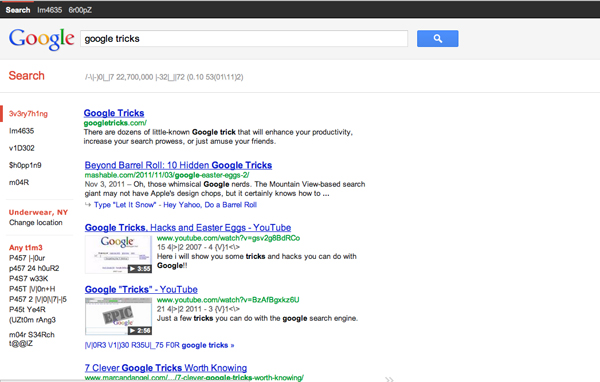
7. Google Hacker
Those who are familiar with the so-called language of hackers (1337 5p3@k or “leet speak”) may love using this Google trick to amuse haxor pals or confound the squares. Sure, the trick isn’t much trickier than  swapping letters for moderately analogous numbers or ASCII characters — e.g. “G” becomes “6″, “E” becomes “3″, “N” becomes “||”, etc — But it’s still fun symbol-play, and still somehow feels like a secret language, despite that we all now w00t every time we are overcome with joy.

8. Google Barrel Roll
A Fun Google trick that is still accessible today, the barrel roll means exactly as it says: make Google do a barrel roll. Simply type “Do a barrel roll” into the search bar and Google dutifully obeys. Warning: This Especially Fun Google Trick is known to make babies cry and grown men squeal with delight.

9. Google Rainbow
Like a handful of the other Fun Google Tricks included in this list, this third-party website that has no official affiliation with Google but only offers its two cents in letting people experience the search engine in a delightful way. If you like colors, this site delivers it—although it may remind you more of the internet circa early-1990s, with all its animated GIFs.
10. Google Sphere
Google Sphere turns every little element you commonly see on Google’s homepage into a swirling “sphere.” It’s pretty cool, but it’s no longer implemented on Google. To see how it once worked, just visit the link below.
11. Google Spam
Probably not an actual Google trick but more a manifestation of how Google offers users related information. In the folders in your Gmail account, you usually see a one-line text advertisement from Adsense. But in the Spam folder, what you’ll see is a real Spam recipe—yes, it’s a recipe for something you can actually eat.
google askew12. Google Tilt or Askew
Typing the word “tilt” or “askew” on Google (specifically if you’re using the Chrome or Safari browser) commands the search engine to “tilt” the whole screen slightly to the right.
13. Dragon Slayer
Those who use Google Docs will find this mildly amusing. If you create or open any spreadsheet, pressing Shift+F12 pops up a message that says: “Dragon slain! Congratulations, you’ve slain the dragon! ]B=8}”.
14. Google Ninja
Who doesn’t love ninjas? Google definitely does. If you’re using your Google Reader feed, press the keys “up, up, down, down, left, right, left, right, B, A” and a ninja (or a couple of them) appear!
15. All the Google Doodles
Over the years, Google has released several of its “doodles”—a temporary re-design of the Google logo made as a tribute to a historical event or the birthday of someone who has changed the world for the better. Through the link below, you’ll find all of the Google Doodles, not only the American versions.
16. Recursion
Type “recursion” into the Google search bar and Google in return asks, rather recursively: “Did you mean recursion?”
17. Google’s Nessie
Use the beach theme with your iGoogle homepage, then very patiently sit there and wait until the clock strikes 3:14 AM. Or you can just more the clock forward and see the monster” that comes out. If you actually waited several hours until 3:14 AM, finally seeing the monster might not totally amuse you.
18. Flight Simulator
What started as an Easter egg became so well-loved that Google eventually turned it into a regular feature of Google Earth. Just click Tools > Enter Flight Simulator, and you’re off to make a round-the-world tour. It would have been more awesome if Google Earth also has a “rocket launcher” feature with unlimited ammo to go with it, but maybe next time.
19. Google MentalPlex
One of the earliest (if not, the earliest) Google April Fool’s joke (this one surfaced in 2000) is the Google MentalPlex. Instead of typing their queries into the search bar, unwitting users were “invited” to just “think” their questions while gazing intently into the MentalPlex circle (apparently to allow Google enough time to “read” your brain signals and transform them into actual search engine queries), then click into the circle to see the results. Even Google’s CEO and co-founder Larry Page called MentalPlex “a quantum leap in finding what you are looking for on the Internet. Typing in queries is so 1999.” It was fun. Especially if you remember that this was the early days of Google, long before the billion-dollar behemoth called Adsense and what-have-you.
20. Google Anagram
Step 1: Type “anagram” into the Google search bar. Step 2: Google asks if you in fact mean “nag a ram.” Step 3: Proceed to LOL.
21. The disappearing “OO”
This is not really a Google fun trick per se, but you can wow your clueless friend with this little “magic.” Click anywhere on the white space of the Dark Arts page (URL in linked title above), then pretend to rub your two fingers on the two OO’s on the Google logo for 2 to 3 seconds, and the O’s will vanish. To bring it back, do the same thing: Click anywhere again and the OO’s will reappear, after which you will be redirected to the real Google.
22. Annoying Google
The “Annoying Google” trick is not really annoying under normal circumstances. Even if you’re in a hurry, Annoying Google’s way of messing up the words as you type them (randomly changing from upper-case to lower-case) is not really annoying. But if you want to see this in action and determine for yourself if it’s really annoying or simply mildly amusing, visit the link below.
23. Epic Google
Epic Google is Google on steroids — not the enhanced performance however, just the obscene bulk. Once the page loads, the logo, search bar, “Search” and “I’m Feeling Excessive” buttons, all swell until they either float off the page or you type a search and get the heck outta there.
24. Weenie Google
Weenie Google is the flip side of Epic Google. Once the page loads, the logo, search bar, “Search” and “I’m Feeling Inadequate” buttons,immediately begin to shrink to inscrutable and barely-usable sizes. Is fun, no?
25. Chicken Rolling
“Rick-rolling” is a popular prank that involves redirecting the unwitting user to a video of music artist Rick Astley singing one of his hit songs (most often “Never Gonna Give You Up”). Chicken-rolling, on the other hand, is like Rick-rolling, but with one dancing man eating fried chicken legs. To subject your unwitting friend to this prank, type the code “2204355” then click “I’m feeling lucky.” See what happens.
Whew. What a lot of fun that list provides.

Monday, May 6, 2013

Golden Rule To Internet Security: Change Your Passwords

In today’s technology-powered world, everything from our emails, social networking sites to our Internet banking details is protected by invisible walls built on code, accessible by us with a string of characters, also known as the password. As technology continues to better (and plague) our lives, it has become inevitable that our information can, and is stored online.
And why not? You get easy access to it regardless of where you go, where you are, and let’s not forget the convenience of not having to queue up to settle your banking and official matters (that electricity bill isn’t going to pay itself).


(Image Source: Fotolia)
These days, even shopping can be done online. You can even order anything from fashion items to fast food, luxury items to everyday groceries over the Internet. We know how to use these tools and services, but do we actually know how to keep our online accounts and information safe?
If you secretly answered yes to that, then you’re in luck. Skip ahead to ‘Check the Strength of Your Password’ to give your password a try. See if it is actually strong enough to withstand hacking.

Tuesday, April 9, 2013

Hack a Facebook Account Using a Fake login Page

1. First a fall you need a fake login page for facebook (fake.html),and a Php script to redirect and capture the victims passwords  (login.php), You can download both the files from Here


2. To get the password click Here 


3. After you download the files, Open login.php,with a note pad and search for the term www.enteryoursite.com and replace it with the site address where you want the victim  to be redirected ,finally save it


Note : This a very important step redirect the victim to a proper site other wise the  victim will get suspicious .In our case we are making fake face book login page so its  better to redirect the victim to www.facebook.com/careers


4. Now create an account at Free web hosting site like 110mb.com , T35.com or ripway.com


5. Now upload both the files (fake.html , login.php ) to your hosting account and send the fake.html(fake facbook login page) link to your victim


   Example :-  
                         www.yoursite.110 mb.com/fake.html


6. Now when the victim enters all his credentials, like login name and password in our fake login page and  when he clicks login He will be redirected to site which we did in step 3 


7. Now to see the victims id ,password, login to your hosting account "110mb.com " where you will see a new file "log.txt" .Open it to see the victims user id and the password


Live Demo
Most of you get confused so I've made a  demo, Click the following link for Live Demo       Fake-facebookpage(phisher) . Enter some trial worlds. I strongly object you  not to enter your original details , You can see the words that you entered from Here (log.txt)


Note:- If your still confused, you can watch my video on  Hack a Facebook Account Using a Fake login Page 


This is a simple but a very effective method to Hack face book accounts .If you have any doubts please feel free to comment !!

Wednesday, July 18, 2012

How To Recover Deleted Files For Free


In this post Im going to show you how to recover deleted files with Easeus Data Recovery Wizard Free Edition . It allows you to recover 1 GB data for free.
1) Download Easeus Data Recovery Wizard Free Edition from this LINK and install it on your PC
2) Launch Easeus Data Recovery Wizard and click on Deleted File Recovery
3)Select file types and Click Next
4) Select Partitions to scan Deleted Files and Click Next.
5) It will lists deleted files , select the file that you want to recover , (right click -> recover) .

Sunday, July 8, 2012

How To Login To Multiple Facebook Accounts With Google Chrome


1. Login to your First Facebook Account as always.
2. Click the Wrench to bring Google Chrome options, and Click New incognito window (or Press Ctrl+Shift+N)
3. It will bring you a new private window that stores all cookies apart (cookie don’t collapse with the first account’s cookie) You’ll notice a secret agent in the top left corner of Google Chrome.
4.Go to Facebook.com in the new private window, and Login to your second account
Note: This method works also for: Gmail, Hotmail, Yahoo Mail, Twitter and many other accounting websites.